
Submitting a Support Package is a key part of maintaining a healthy Redis cluster. Once you begin using Redis in production, it’s beneficial to Submit a Support Package to help identify and address potential issues early. You can Generate a Support Package in several ways, including the Cluster Manager UI, the Command-Line Interface, or the REST API.
Once you submit your Support package, you’ll receive a Cluster Health Analysis that includes recommendations tailored to your deployment.
What Is a Support Package?
A support package is a compressed .tar.gz file that contains critical diagnostic information used by the Redis support team. It includes:
Logs – System, cluster, and database logs
Configuration files – Cluster and node configuration details
Cluster statistics – Runtime metrics and performance indicators
Support packages are essential for resolving issues quickly and are often requested with support tickets. They’re also used for routine cluster health analyses. Creating a support package can take several minutes and generate additional load on the cluster. When possible, schedule collection during a lower-traffic window, especially for production environments.
When to Submit a Support Package
After entering production (as part of onboarding)
Before any upgrade (to provide a pre-upgrade view of cluster health and help prevent issues. Collect on a healthy cluster with no running actions, use the Admin Console or the CLI/REST methods for your version)
When opening a support ticket
During ongoing cluster health reviews
When prompted by Redis support
When encountering reproducible errors (e.g., 406 FeatureSet mismatch), sync failures, import stalls, or data inconsistencies (e.g., Oracle→Redis via RDI not updating)
How to Generate a Support Package
You can generate a support package using one of three methods: Cluster Manager UI, Command-line, or REST API.
Cluster Manager UI Method
To create a support package from the Admin Console:
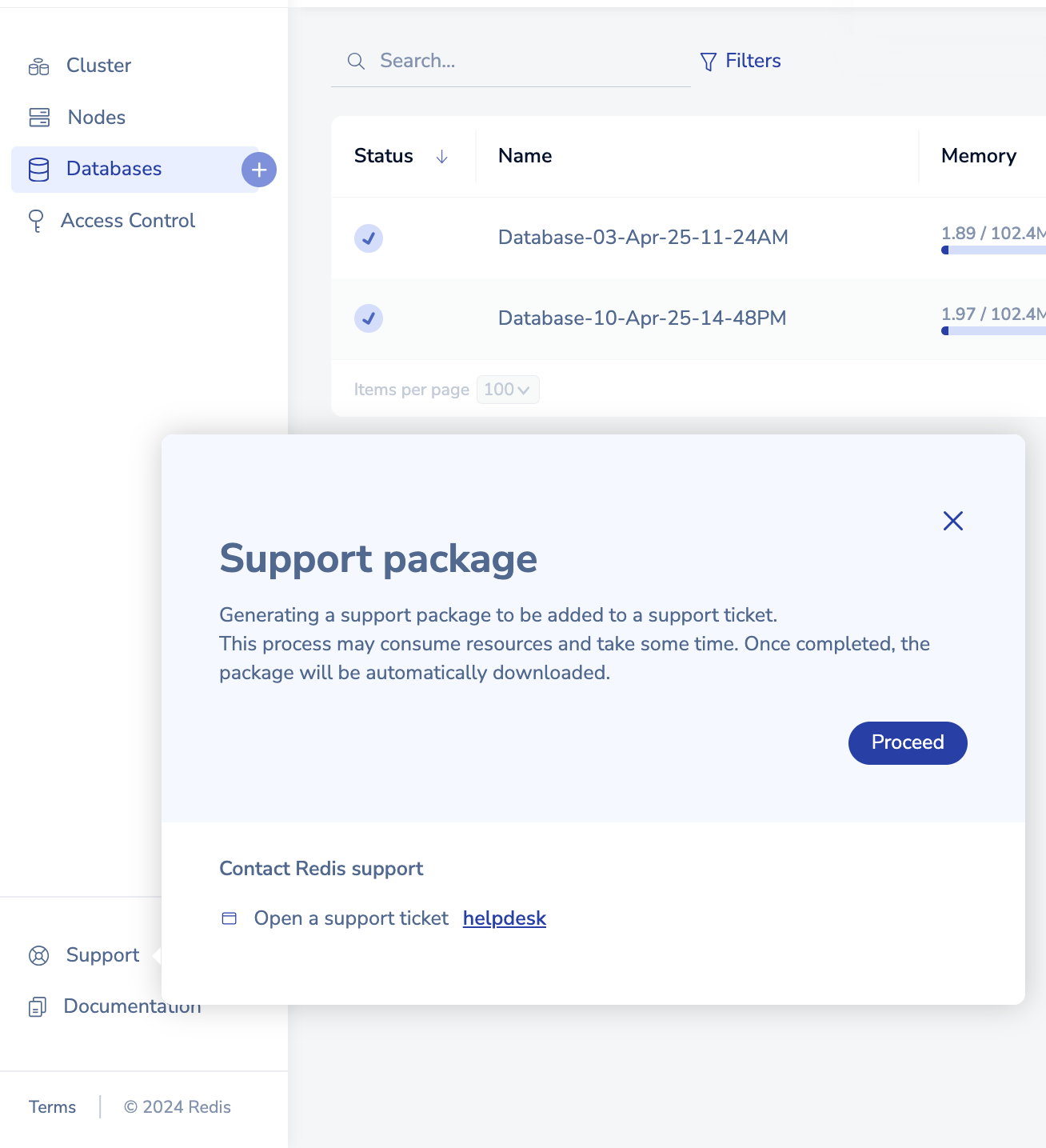
In the navigation menu, go to Support.
-
Click Support > Create Support Package, then click Proceed.
Note: Starting in version 7.4.2, which introduced the new cluster UI as the default, there's no secondary dialog or “Create Support Package” menu when generating a support package. If you're using an earlier version (e.g., 7.2.4), the original two-step process still applies.
-
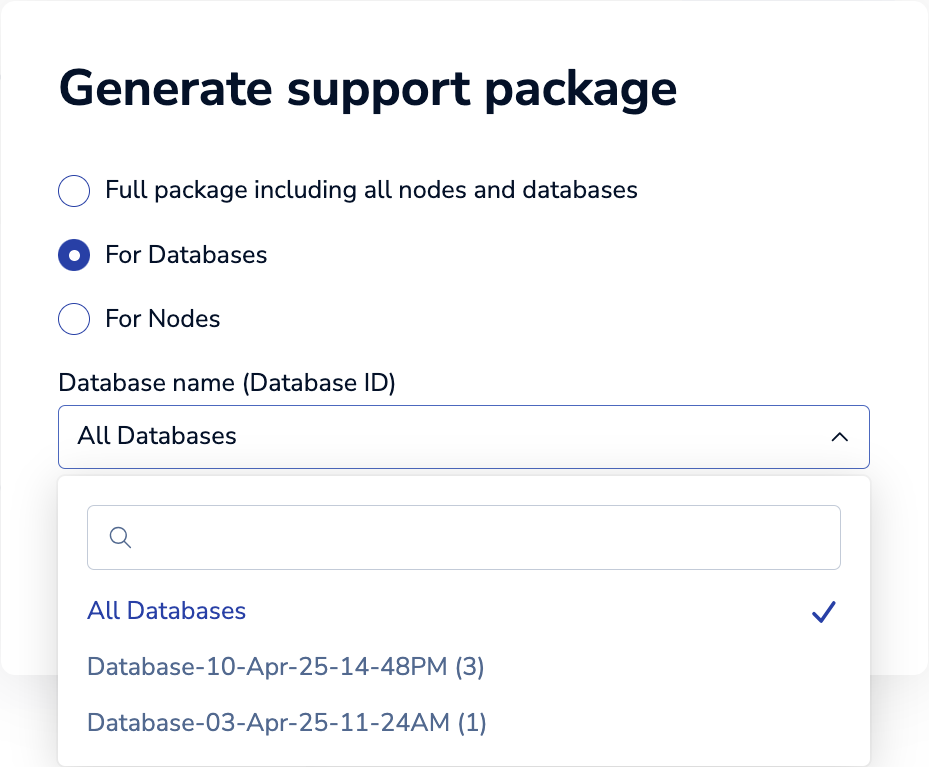
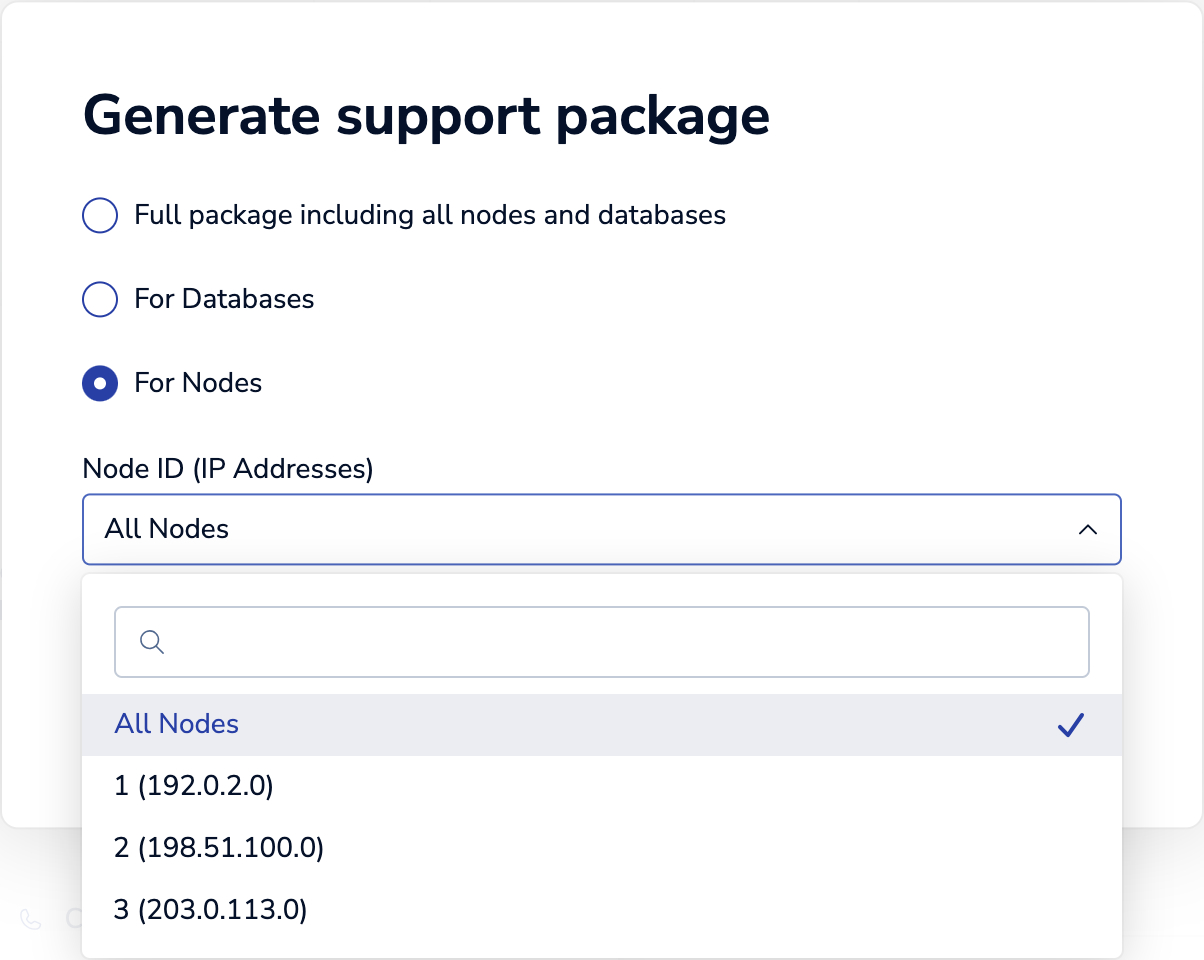
In the Generate Support Package dialog, choose one of the following:
Full package (all nodes and databases)
-
For Databases:
Select All Databases to include all databases.
Or select a specific database from the list.
-
For Nodes:
Select All Nodes to include all nodes.
Or select a specific node from the list.
Click Generate package.
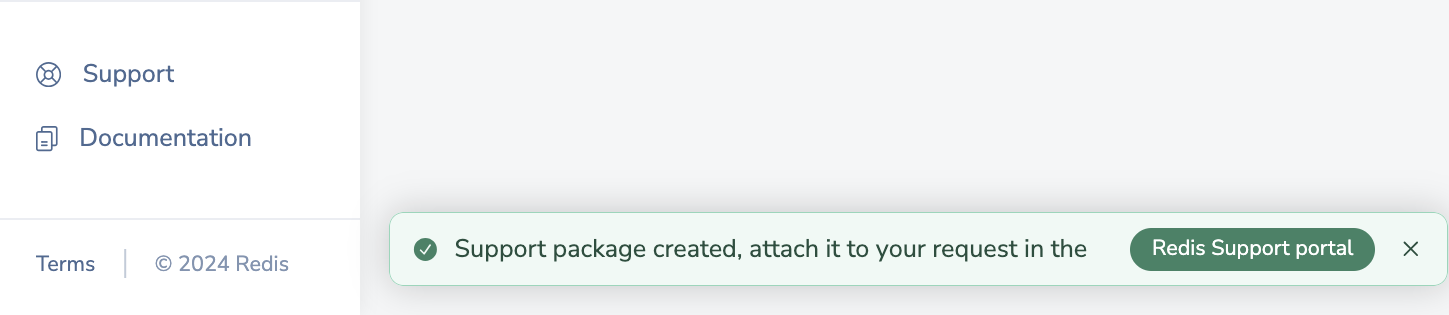
Your browser downloads the
.tar.gzfile.An alert confirms package creation and provides a link to the Redis Support portal.
Command-Line Method
If the UI is unavailable or the package fails to generate:
A. Create from any node /opt/redislabs/bin/rladmin cluster debug_info
B. If there's not enough space in /tmp
Change the destination path (use the full path to rladmin for consistency and to avoid $PATH issues):
Make sure the redislabs user has write access to this path on all nodes.
Re-run the command: /opt/redislabs/bin/rladmin cluster debug_info
C. As a fallback, create from each node individually /opt/redislabs/bin/debuginfo
This creates an archive file on each node. Be sure to upload all resulting .tar.gz archive files to Redis Support—not just one. The file paths will be shown in the command output. This approach serves as a fallback when a cluster-level package can't be created.
REST API Method
Use the REST API to generate and download support packages:
All nodes & databases:
GET /v1/cluster/debuginfoAll nodes:
GET /v1/nodes/debuginfoSpecific node (replace
<uid>):GET /v1/nodes/<uid>/debuginfoAll databases:
GET /v1/bdbs/debuginfoSpecific database (replace
<uid>):GET /v1/bdbs/<uid>/debuginfo
Recommended diagnostics to collect
To diagnose cluster health, stability, or maintenance-related issues, Redis Support relies on a support package plus a small set of command outputs that capture the cluster’s live state.
What to collect
Support package
Generate a full support package that includes all nodes and all databases whenever possible.
If a cluster-level package cannot be created, generate a package from each active node involved in the issue.
Command outputs
From any active node, collect: /opt/redislabs/bin/rladmin status extra all
Includes extended cluster status, placements, and shard metadata.
If a single database or shard is involved, also collect: /opt/redislabs/bin/rladmin info db <DB_ID>/opt/redislabs/bin/rladmin status shards
If the support package is large or upload-constrained
Preferred upload method
If Redis Support has given you an SFTP upload link, go ahead and use it. There are no file size restrictions when using this link.
If you must upload through the support portal or email, follow the 50 MB per-upload limit.
Reduce package size when appropriate
When the goal is troubleshooting rather than data recovery, exclude large persistence artifacts if supported by your collector, such as:
--skip_aof--skip_db_backups
These options are available in log-collection tools such as the Kubernetes log_collector.py script and similar collectors; they are not rladmin flags. Use them only where your collection tool explicitly documents support for these parameters.
Split Large Support Packages on Windows
If your support package is too large to upload as a single file, split it into smaller archive parts before attaching it to your support case.
Recommended option: Use WSL if available
If Windows Subsystem for Linux (WSL) is installed, open WSL and use the standard Linux split command the same way you would on a Linux host.
Alternative option: Use 7-Zip
If you use the 7-Zip desktop application:
- Right-click the support package archive.
- Select 7-Zip.
- Choose Split file.
- Set the split size to
50M. - Upload all generated parts to the support case.
If 7-Zip is installed and available in PowerShell, run:
7z a -v50m <archive_name>.7z <archive_name>Example:
7z a -v50m debuginfo.540D5484EAFD92F1.tar.gz.7z debuginfo.540D5484EAFD92F1.tar.gzThis creates split archive files similar to:
debuginfo.540D5484EAFD92F1.tar.gz.7z.001
debuginfo.540D5484EAFD92F1.tar.gz.7z.002
debuginfo.540D5484EAFD92F1.tar.gz.7z.003
Upload all generated archive parts to the support case. Keep the filenames unchanged and ensure all parts are uploaded together so the archive can be reconstructed successfully.
If support package generation fails
Insufficient space
If generation fails due to limited space in /tmp or the staging path, configure an alternate output directory with more available disk space and re-run the collection. See Command-Line Method for steps.
Note: Support packages are not automatically cleaned up from debuginfo_path (by default, /tmp). Each run creates a uniquely named .tar.gz file. Periodically remove old debuginfo*.tar.gz files from this path on all nodes to prevent disk space exhaustion.
Ongoing shard activity
Verify that shard resyncs or state-machine tasks have completed before generating the package.
Re-run: /opt/redislabs/bin/rladmin status extra all
Ensure shards show stable roles (master or replica) with no active resync.
What to include when submitting diagnostics
The support package for the entire cluster, or packages from each affected node
The command outputs listed above
A brief UTC timeline of the issue, any recent maintenance windows, and the Redis Software version
Important: Support packages must be associated with an open Redis Support ticket. Packages cannot be submitted without a ticket.
Uploading a Support Package
Attach the support package in the Attachments section or upload it using the ticket’s secure upload link.
Upload size limit
Each upload is limited to 50 MB.
Recommended upload method
Upload the full support package (.tar.gz) as-is using the provided secure HTTP upload link.
If the upload fails due to file size or timeout, split the package into 50 MB parts and upload all parts.
Split a large support package (Linux)
split --bytes=50M support_package.tar.gz support_package_part_Uploading split files
Upload each generated file using the secure HTTP upload link, or
Attach all split files directly to your support ticket.
Cluster Health Analysis
When you submit a support package proactively or during onboarding, the Redis team performs a Cluster Health Analysis. This analysis provides:
Early detection of misconfigurations or risk factors
Performance and stability insights
Recommendations for improvements and best practices
0 comments
Please sign in to leave a comment.